Your first UDP integration
Use Python to find a connected MATRIC device, change a button label and publish a variable. The complete example uses only Python's standard library.
Prepare MATRIC
- Run MATRIC Server on Windows and connect a supported client.
- In Settings, enable Enable 3rd party integration. If Require integration PIN is enabled, leave it enabled and authorize your example when prompted.
- Check Integration API port in advanced network configuration. The default is 5300. Save settings; restart MATRIC after changing network ports.
- In a test deck, add a button and set its Name to
Statusin control properties. Save the deck and load it on your client.
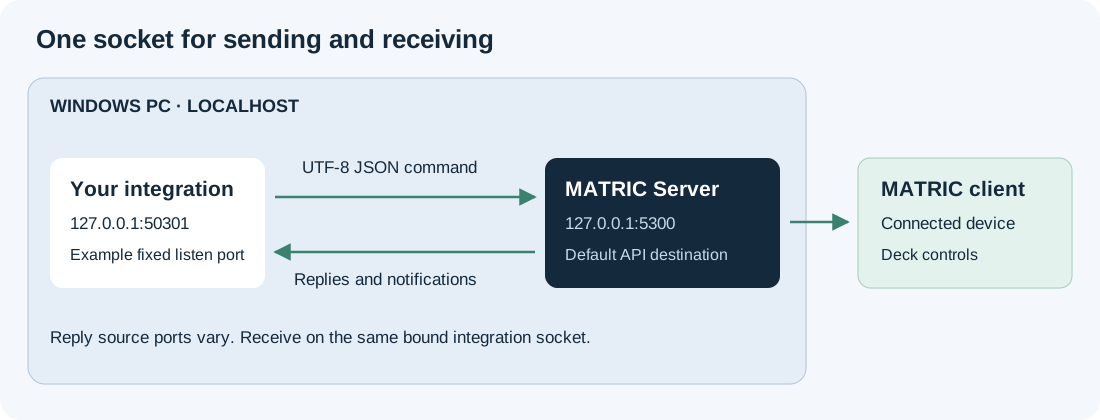
The API listens on 127.0.0.1, not the PC's LAN address. Run this example on the Windows PC running MATRIC. A program on another machine needs a local companion process that talks to this API.
Run the example
Install Python 3 on that PC and copy status.py there. From its folder, run:
The program first sends CONNECT. If MATRIC asks you to authorize Hobby status demo, approve it and enter the displayed PIN into the terminal. Keep leading zeroes. With PIN checking disabled, press Enter at the terminal prompt.
The example prints the connected clients, selects the first one, sets the Status button label to Hello from Python, then publishes hobby_temperature = 23.5. It keeps listening and prints control interactions and variable updates until you press Ctrl+C.
To choose a client or use different ports:
Use the client ID from the printed list. --port is MATRIC's receiving port; --listen-port is your program's port. Keep your listen port stable across restarts and give separate integrations distinct application names and listen ports.
Understand the command
The button update is one UTF-8 JSON object in one UDP datagram:
{
  "command": "SETBUTTONPROPS",
  "appName": "Hobby status demo",
  "appPIN": "YOUR_PIN",
  "clientId": "YOUR_CLIENT_ID",
  "buttonName": "Status",
  "data": { "text": "Hello from Python" }
}
This changes the running client display. It does not edit the saved deck or trigger the button's actions. Reloading the deck can restore its saved appearance.
Replies contain JSON inside a string:
Read the UDP reference for commands, state objects and event payloads. Continue with the live status recipe to display your variable in an applet.
More integration examples
For complete Windows C# applications, see MATRICIntegrationDemo. It includes raw UDP and C# SDK examples, a demo deck and build instructions.
For a real-world example, see DCS-BIOS-MATRIC-Middleware. It connects DCS World cockpit data and controls to MATRIC and includes its own setup guide.