Stream Deck plugin compatibility
Experimental: MATRIC hosts a supported subset of the Stream Deck plugin protocol. Use it to reuse plugin actions or build a plugin backend for desktop work. Test each plugin version and action with your target clients and external applications.
For a custom interface drawn inside a deck, start with an applet. A Stream Deck plugin instead receives logical control events and can send supported appearance updates back through MATRIC.
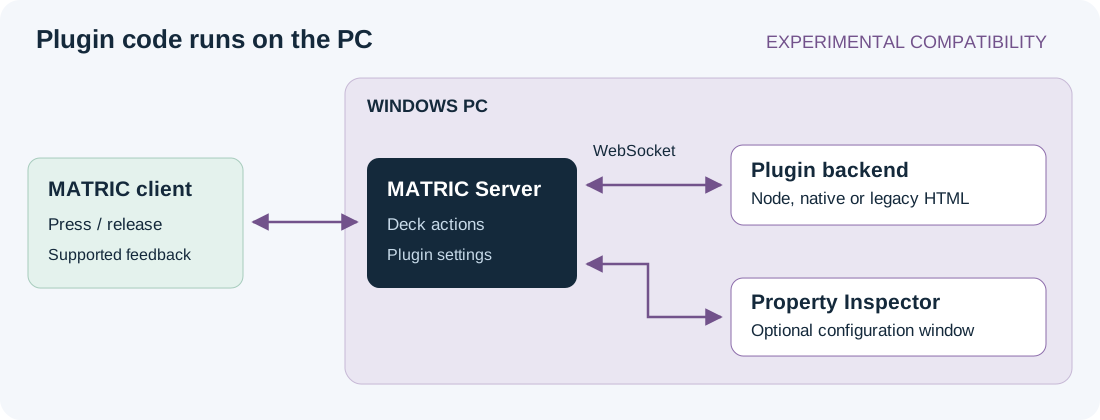
Import an existing plugin
- Use a complete MATRIC Desktop installation and a matching supported client. Have the plugin's complete, unpacked
.sdPluginfolder ready. - Open Settings > Stream Deck plugins, or Manage Stream Deck plugins from a control's plugin action.
- Set Import source to the parent folder containing the
.sdPluginfolders. The default Elgato location is%APPDATA%\Elgato\StreamDeck\Plugins. - Select a package and choose Import selected plugin. MATRIC makes a managed copy in
Documents\MATRIC\sdplugins. Importing does not start its backend or change the original installation. - On a test control's press event, add Stream Deck plugin container, then select Choose plugin action.
- Choose Configure if the action has settings. MATRIC may automatically save the whole deck, including other pending edits, and clear undo history before opening the configuration window.
- Configure the plugin's target application, close the window, load the saved deck on a client and test the control.
Direct Marketplace installation and double-click installation of .streamDeckPlugin archives are unsupported. Protected packages cannot be used; an unreadable manifest may also be malformed or damaged. Obtain a complete package you are allowed to run and redistribute.
Build a minimal plugin
The Hello plugin example counts presses and changes the control's title. It needs no npm packages or external service. It declares Node 24 and uses that runtime's built-in WebSocket client; do not change the manifest to Node 20 without providing a WebSocket implementation.
Download its manifest.json, plugin.mjs and icon.svg.

Copy the complete folder to a development directory on the MATRIC PC:
Choose my-plugins as the import source, import Hello plugin, and assign its Count presses action to a button's press event. Save the deck and load it on a client. Each press should display Count 1, Count 2, and so on. Counts are temporary and reset on each willAppear, including when MATRIC refreshes actions after Windows wakes. This action has no Property Inspector, so no configuration window is required.
The backend reads the port, registration event and registration identifier from its launch arguments. It registers with MATRIC, creates state on willAppear, handles keyDown, and removes state on willDisappear. A setTitle response uses the event's context, never a hard-coded control ID. Registration and event shapes follow the Elgato WebSocket protocol.
send({ event: 'setTitle', context: message.context,
  payload: { title: 'Count ' + count, target: 0 } });
The manifest identifies the package, backend and actions; see the Elgato manifest reference. MATRIC's support limits below still apply when a manifest or SDK exposes more features.
Know the compatibility boundary
| Area | MATRIC behavior |
|---|---|
| Package backends | Windows native .exe, JavaScript and legacy HTML entry points; native dependencies remain package-specific |
| Declared Node runtime | 20 or 24; legacy/unspecified JavaScript uses Node 20 |
| Manifest SDK versions | 1–3 accepted by package validation; acceptance does not certify every SDK feature |
| Keypad input | Discrete press/release; rotary controls can produce button-style click pairs in Keypad mode |
| Encoder input | Relative signed rotation ticks and center down/up on compatible rotary actions; legacy Knob maps to Encoder |
| Keypad appearance | Supported title, image, state and OK/alert feedback; runtime only |
| Settings and messaging | Per-action/global settings and backend–Property Inspector messaging |
| Resource API | Explicit deck-owned file snapshots through getResources/setResources |
| Application and wake events | Server application monitoring and Windows wake notifications |
| Excluded | Profile switching, Stream Deck deep linking, Elgato .streamDeckAction/.streamDeckProfile import/export, continuous sliders, touch strips and hardware-specific displays |
Encoder mode does not render Stream Deck display feedback. More-than-two-state Keypad action input/appearance is unavailable. Stream Deck Multi Action behavior is not fully reproduced. Account flows that require Stream Deck deep-link callbacks are unsupported. openUrl accepts absolute HTTP/HTTPS URLs only.
A package status of Ready means it passed import validation. A registered backend means it connected to MATRIC. Neither proves that its external service works or that all actions are compatible.
Settings and files
A Property Inspector is the plugin's configuration UI. Keep durable settings in the protocol's settings API; its private browser storage is temporary.
Action settings belong to a saved action occurrence, not merely an action UUID. Global settings are shared by that plugin across the MATRIC server. Plugin API writes persist immediately; closing the inspector, Undo and deck Discard do not roll them back. Configure requires a saved binding.
For files that should travel with a deck, use setResources with a complete key-to-absolute-file-path map. MATRIC snapshots those files into the deck; getResources and event payloads return resolved server-local paths. Replacing the map with {} clears its references. Merely storing a path in settings does not capture the file.
MATRIC copying, Save As and .deck export preserve referenced managed resources with independent identities. Plugin binaries, global settings and external application installations are not included. Install matching dependencies on the receiving PC and configure credentials there.
Lifecycle and multiple devices
Devices loading the same saved deck share its plugin action occurrences, settings and feedback. Plugin events represent the shared deck actions rather than a separate physical Stream Deck screen for every tablet. Page changes do not send ordinary plugin willDisappear; contexts stay active while at least one device has the deck loaded. Do not use willAppear as proof a particular page is visible.
Avoid overlapping holds of the same action from two devices: releasing on one can end the other's effect. If multiple bindings write a control's appearance, the most recent applicable write wins. Use separate controls or deck copies when independent state matters.
Develop and troubleshoot
Edit your source package, stop its backend in MATRIC, then import it again with Replace installed copy. Managed copies do not update automatically. Close Elgato Stream Deck or StreamDock if the plugin cannot run in two applications at once.
Use the management screen's backend state and messages, then the troubleshooting guide. Test settings through restart, action behavior on a real client, external-service recovery and sharing on another PC. Verify the specific plugin and actions you plan to distribute.