Extend MATRIC
Build a small integration, add your own control to a deck, or reuse a supported Stream Deck plugin. You can start with Python or browser JavaScript; you do not need to build MATRIC from source.
Choose an extension path
| You want to… | Start with | Your code runs in |
|---|---|---|
| Show game telemetry, update controls, or react to deck interactions from another program | UDP Integration API | A separate process on the MATRIC Windows PC |
| Create a gauge, dashboard, keypad, or other custom interface inside a deck | Custom applets | An HTML iframe on each client displaying the applet |
| Use an existing plugin action, or write a plugin using the Stream Deck protocol | Stream Deck compatibility | A backend on the Windows PC, with an optional configuration window |
Stream Deck support is experimental. Compatibility depends on the plugin, version, action and external software it uses. Profile switching, Stream Deck deep links, Elgato action/profile import and export, continuous sliders and touch strips are excluded.
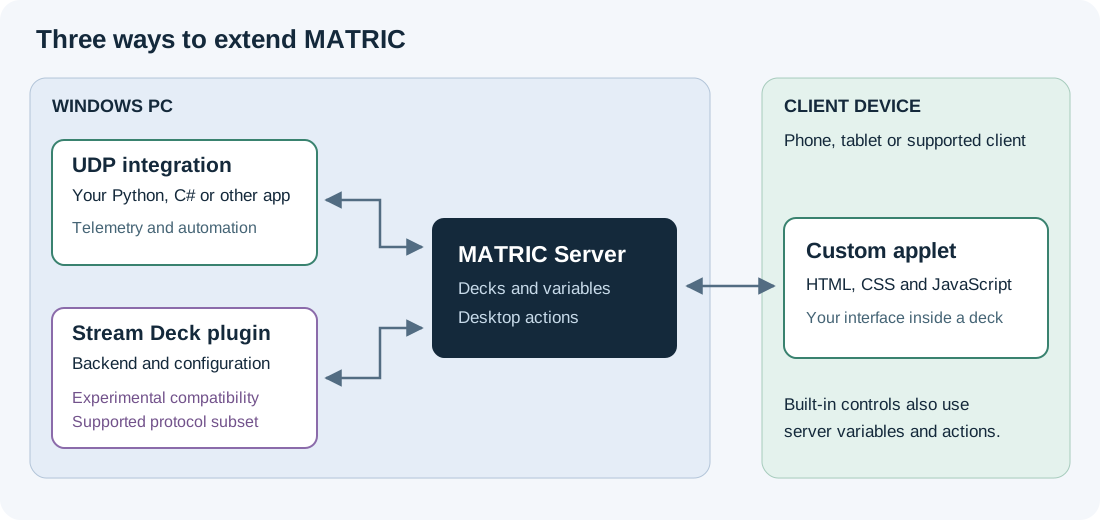
These paths can work together. For example, a Python integration publishes a temperature as a server variable, and an applet draws it as a gauge. Try the live status recipe after your first example.
Building an applet? Copy the starter applet, then read Size and lay out an applet before changing its interface. MATRIC sizes the iframe; your applet must handle its contents, proportions and readable controls.
Understand the building blocks
A server is the MATRIC Windows application that stores decks and executes desktop actions. A client is a connected phone, tablet or supported client application. A deck contains pages; each page contains controls. An action is work assigned to a control event, such as a press or a value change.
Server variables let integrations and built-in features publish named values. Controls can bind properties to them, and applets receive their current values. Use a prefix you own, such as hobby_temperature, to avoid collisions.
Names and IDs serve different purposes. A control's Name is a developer-assigned label such as Status; it is separate from its visible text. Its Id identifies that particular control. Copy IDs from the editor's control, page or deck properties. Get client IDs through the UDP API.
Follow a short learning path
- Choose one of the three quickstarts and use a disposable deck.
- Run the supplied example and check the expected result.
- Read that path's reference when you need more than the example.
- Follow sharing and troubleshooting before distributing your work.
Keep execution and persistence separate
| Change | Where it lives |
|---|---|
| UDP button appearance or control state | Current client runtime; does not rewrite the saved deck |
| Applet parameter and action binding | Saved deck configuration |
| Applet JavaScript variables | That iframe's memory, unless the applet implements persistence |
| Stream Deck action settings | Saved action occurrence in the deck; API writes persist immediately |
| Stream Deck global settings | Shared plugin settings on that MATRIC server |
Install applets and plugins only from authors you trust. An applet is browser code; a plugin backend can execute native code on the PC. An applet event invokes actions the deck author has explicitly assigned to it.
Public integration examples
See MATRICIntegrationDemo for complete raw UDP and C# SDK applications, a demo deck and Windows build instructions.
DCS-BIOS-MATRIC-Middleware is a real-world, two-way integration between DCS World and MATRIC: cockpit indicators update deck displays, and deck controls send commands to DCS-BIOS. It requires a configured DCS-BIOS setup; see that project for installation and connection instructions.